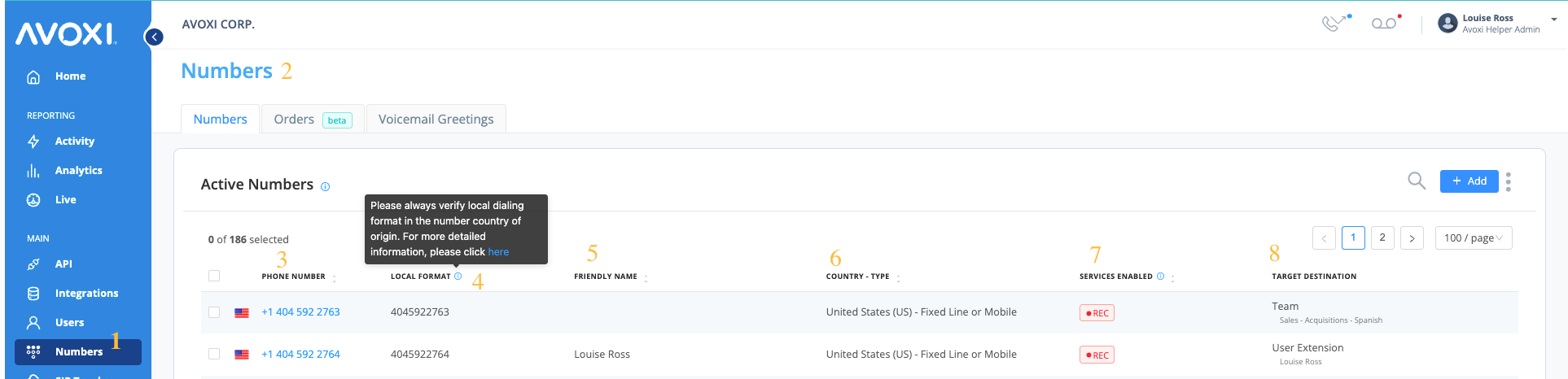
All users can view all Toll-Free, Local (DID, DDI), Mobile, and TrueLocal AVOXI virtual numbers associated with your company's account on the Numbers Dashboard of your AVOXI online platform.
View your numbers
- Select the "Numbers" section in the left-side navigation bar to view your numbers.
- You can now view all numbers associated with your account on your organization's "Number Dashboard" under the "Manage" tab.
- Phone Number: Under the "Phone Number" column, you can view a list of all active phone numbers.
- Local Format - Always verify the local dialing format in the number country of origin; more information can be found here
- Friendly Name - This allows admins to assign user-friendly labels to numbers.
- Country & Number Type - Toll-Free, Mobile, or Fixed Line.
- Services Enabled - This column will show which services are enabled on that particular number (for example, Voicemail / Call Recording / SMS/TrueLocal).
-
Target Destination - How incoming calls to a specific number will be answered (example: forward to an external number/voicemail/extension/SIP Forwarding/MS Teams) and to who the number is assigned.