Deleting Teams

As an Administrator and Supervisor, you can delete team members who have left the company or moved to another team.

  • To delete an existing team, select the "Teams" icon located on the left-hand side navigation bar. 
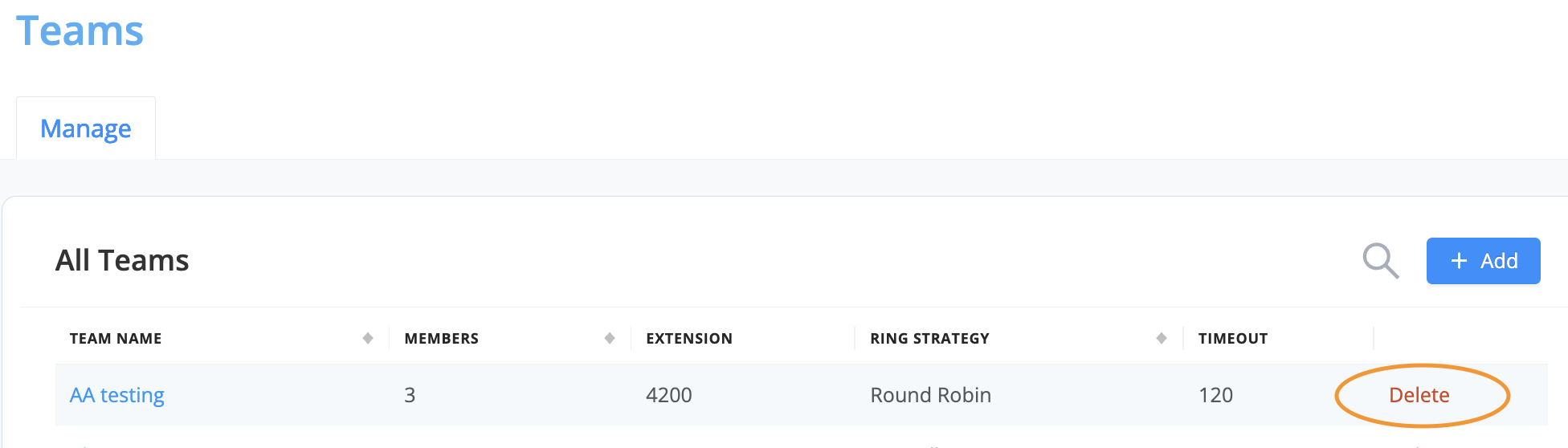
  • On the "Teams" homepage, you can view a list of all teams or search for a particular team.  
  • Select the "Delete" button next to the team you wish to delete.

WARNING: Before deleting a team, it's essential first to update the date of any call forwarding or IVR rules set to go to the deleted team.

Was this article helpful?

Have more questions? Submit a request

Updated:

March 21st, 2023

Author:

Lauren Hundley

Updated By:

Kay Senior

KB ID:

394924

Page Views:

5837

Tags:

deleting teams, erase squads

Can't find what you're looking for?

Contact our award-winning customer care team.